Best AI for Coding: Top 10 Free & Paid Tools Compared
In the fast-evolving world of software development, best AI for coding tools have become essential for developers of all skill levels. Whether you’re looking for AI coding tools to generate code, debug issues, or optimize performance, the right tool can transform your development experience.
This comprehensive guide explores the best AI coding tools for beginners and experts alike, comparing free and paid options to help you choose the perfect fit. With coding AI, you can turn ideas into functional applications faster than ever, making it an exciting time to explore these innovative tools.
1. Why AI coding tools are game-changers
AI coding tools are revolutionizing software development by automating repetitive tasks, offering real-time suggestions, and enabling natural language-based programming. Unlike traditional coding environments, these tools leverage advanced machine learning models to understand context, predict needs, and generate high-quality code snippets. For beginners, they lower the learning curve by providing intuitive interfaces and guided coding experiences. For professionals, they save hours by handling boilerplate code, debugging, and optimization.
The best AI for coding goes beyond simple autocompletion. These tools can interpret natural language prompts, allowing you to describe functionality in plain English and receive accurate code in return. They integrate seamlessly with popular IDEs like VS Code, PyCharm, and IntelliJ, or operate as standalone platforms for end-to-end development. From writing clean Python scripts to building full-stack web applications, AI coding tools are versatile enough to support diverse programming languages and frameworks.
Moreover, these tools foster collaboration by generating documentation, suggesting refactoring improvements, and even assisting with code reviews. Whether you’re a solo developer or part of a large team, coding AI enhances efficiency and code quality, making it a must-have in modern development workflows.
Benefits for beginners
For those just starting, the best AI coding tools for beginners simplify complex concepts. They offer real-time error detection, explain code in plain language, and provide step-by-step guidance. Tools like these make learning to code feel less intimidating, enabling new developers to build projects quickly and gain confidence.
Advantages for experienced developers
Seasoned coders benefit from AI’s ability to handle repetitive tasks, suggest optimizations, and debug complex issues. By automating mundane aspects of coding, these tools free up time for creative problem-solving and innovation, allowing developers to focus on high-level architecture and design.
2. Key features to look for in AI coding tools
Choosing the right AI coding tools depends on your specific needs, whether you’re a beginner or a professional. Here are the critical features to consider when evaluating the best AI for coding:
Code generation and autocompletion
The hallmark of any great coding AI is its ability to generate accurate, context-aware code. Look for tools that support multiple programming languages (e.g., Python, JavaScript, Java, C++) and can generate everything from single functions to entire modules based on natural language prompts.
Debugging and error detection
Top-tier tools identify syntax errors, logical bugs, and performance bottlenecks in real time. Some even suggest fixes or rewrite problematic code, saving hours of manual debugging.
IDE integration
Seamless integration with popular IDEs ensures you can use AI tools without disrupting your workflow. The best tools offer plugins or extensions for environments like VS Code, JetBrains, or Eclipse.
Natural language processing
The ability to translate plain English (or other languages) into functional code is a game-changer. This feature is especially valuable for beginners who may not yet be fluent in programming syntax.
Collaboration and documentation
AI tools that generate documentation, suggest code comments, or facilitate team collaboration are ideal for projects involving multiple developers. Some even integrate with version control systems like Git.
Customization and learning
The best tools adapt to your coding style, learn from your projects, and offer personalized suggestions over time. This ensures a tailored experience that evolves with your skills.
3. Top 5 free AI coding tools
Free AI coding tools are perfect for beginners, students, or developers on a budget. While they may have limitations compared to paid options, these tools still pack powerful features. Here are five standout free tools:
GitHub Copilot (Free Tier)
GitHub Copilot, powered by advanced AI models, is a favorite among developers for its robust code suggestions and autocompletion. The free tier offers basic functionality, including real-time code generation and debugging support across multiple languages. It integrates seamlessly with VS Code and other IDEs, making it a go-to for many coders.
Tabnine (Free Plan)
Tabnine uses machine learning to provide context-aware code completions. Its free plan supports popular languages like Python, JavaScript, and TypeScript, with lightweight IDE integration. It’s particularly beginner-friendly due to its intuitive interface and helpful suggestions.
Replit with AI Assistant
Replit’s AI-powered assistant is embedded in its online coding environment, offering real-time code suggestions, error detection, and explanations. It’s ideal for beginners learning to code in Python, JavaScript, or HTML/CSS, as it combines a collaborative IDE with AI support.
Codeium (Free Tier)
Codeium is a versatile coding AI that provides free access to code generation, autocompletion, and refactoring tools. It supports over 70 programming languages and is known for its speed and accuracy, making it a great choice for both beginners and experienced developers.
Hugging Face CodeGen
Hugging Face’s CodeGen tool leverages open-source AI models to generate code from natural language prompts. It’s free to use and supports a variety of languages, making it a solid option for developers experimenting with AI-driven coding.
4. Top 5 paid AI coding tools
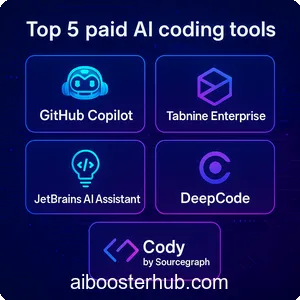
Paid AI coding tools often offer advanced features, higher usage limits, and premium support. These are ideal for professional developers or teams working on large-scale projects. Here are five top paid tools:
GitHub Copilot (Pro Version)
The pro version of GitHub Copilot unlocks advanced features like multi-file context awareness, enhanced debugging, and priority support. It’s a powerhouse for professional developers working on complex codebases.
Tabnine Enterprise
Tabnine’s paid plan offers team collaboration features, custom model training, and enhanced security for enterprise environments. It’s designed for organizations needing robust AI support across multiple developers.
JetBrains AI Assistant
Integrated into JetBrains IDEs like IntelliJ and PyCharm, this AI assistant provides context-aware code generation, refactoring suggestions, and documentation support. It’s a premium choice for developers already using JetBrains tools.
DeepCode
DeepCode uses AI to analyze codebases for bugs, security vulnerabilities, and performance issues. Its paid plan includes advanced analytics and team collaboration features, making it ideal for large projects.
Cody by Sourcegraph
Cody is a paid AI tool that excels at code navigation, generation, and documentation. It’s designed for teams, offering features like codebase-wide context analysis and integration with Git workflows.
5. Comparing free vs. paid AI coding tools
Choosing between free and paid AI coding tools depends on your budget, project complexity, and desired features. Here’s a breakdown to help you decide:
Free tools: Pros and cons
- Pros: Accessible to everyone, beginner-friendly, sufficient for small projects or learning.
- Cons: Limited features, usage caps, and less advanced context awareness compared to paid options.
Paid tools: Pros and cons
- Pros: Advanced features like multi-file analysis, team collaboration, and custom model training. Often include priority support and higher reliability.
- Cons: Requires investment, which may not be necessary for casual coders or small-scale projects.
When to choose free tools
Free tools are ideal for beginners, students, or hobbyists experimenting with coding. They’re also great for small projects or when you’re testing AI tools before committing to a paid plan.
When to upgrade to paid tools
Paid tools suit professional developers, teams, or projects requiring advanced features like large-scale code analysis, enhanced security, or custom integrations. If you’re working on enterprise-level applications, paid tools often provide better scalability.
6. How to choose the right AI coding tool for you
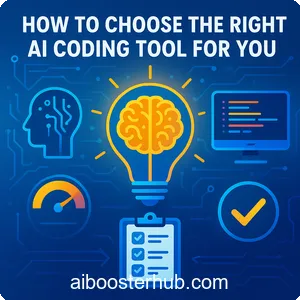
Selecting the best AI for coding depends on your goals, skill level, and workflow. Here’s a step-by-step guide to making the right choice:
Assess your skill level
Beginners should prioritize tools with intuitive interfaces, error explanations, and learning resources. Experienced developers may want advanced features like custom model training or multi-language support.
Consider your project needs
Are you building a simple web app or a complex backend system? Ensure the tool supports your programming languages and integrates with your preferred IDE or workflow.
Evaluate integration and ease of use
Look for tools that fit seamlessly into your existing setup. Check for compatibility with your IDE, version control systems, and team collaboration platforms.
Test free versions first
Most paid tools offer free tiers or trials. Experiment with these to gauge their effectiveness before investing in a premium plan.
Check community and support
Tools with active communities, tutorials, and reliable support are easier to adopt, especially for beginners. Paid tools often include priority support, which can be a lifesaver for critical projects.
7. The future of AI in coding
The best AI coding tools are just the beginning. As AI continues to evolve, we can expect even smarter assistants that understand entire codebases, predict project requirements, and automate testing and deployment. Future tools may integrate more deeply with DevOps pipelines, offer real-time collaboration across global teams, and support emerging languages and frameworks.
For beginners, the best AI coding tools for beginners will likely become more educational, offering interactive tutorials and gamified learning experiences. For professionals, AI could take on more complex tasks like architectural design or cross-platform optimization, further blurring the lines between human and machine coding.
By staying updated with these advancements, developers can leverage coding AI to stay competitive, reduce burnout, and focus on what truly matters: building innovative, impactful software.
8. Conclusion
This guide to the best AI for coding provides a roadmap to choosing tools that align with your needs. Whether you opt for free or paid solutions, these AI coding tools empower you to code smarter, faster, and with greater confidence. Start exploring today and unlock the full potential of coding AI in your development journey.