ChatGPT for Coding: Tips, Tricks & Best Practices
The rise of artificial intelligence has transformed countless industries, and coding is no exception. Among the most powerful tools in this space is ChatGPT, particularly when paired with its coding-focused predecessor, ChatGPT Codex. Whether you’re a seasoned developer or a beginner, leveraging ChatGPT for coding can significantly enhance your productivity and creativity. In this comprehensive guide, we’ll explore tips, tricks, and best practices to help you maximize the potential of ChatGPT code and GPT code generation, ensuring you create high-quality, efficient, and innovative solutions. Let’s dive in and unlock the full potential of Chat GPT for coding!

1. Understanding ChatGPT and Codex for coding
What is ChatGPT Codex?
ChatGPT Codex, developed by OpenAI, is the backbone of many AI-driven coding tools, including parts of Chat GPT code generation. It’s a specialized model trained on vast amounts of code and natural language, enabling it to understand and generate code in numerous programming languages like Python, JavaScript, Java, and more. Unlike traditional coding assistants, Codex can interpret natural language prompts, making it accessible even for those with limited coding experience. For example, you can ask it to “write a Python function to sort a list” or “debug this JavaScript code,” and it will provide accurate, context-aware responses.
How ChatGPT enhances coding
While ChatGPT itself is a conversational AI, its ability to assist with coding stems from its integration with Codex-like capabilities. By combining natural language processing with code generation, Chat GPT for coding allows developers to interact with the tool as if they were collaborating with a highly knowledgeable colleague. It can explain complex concepts, suggest optimizations, and even generate entire scripts based on simple prompts. This makes it an invaluable asset for both learning and professional development.
Why use ChatGPT for coding?
The appeal of Chat GPT code lies in its versatility. It can assist with writing code from scratch, debugging errors, optimizing existing code, or even explaining code in plain English. Its ability to understand context and provide tailored solutions sets it apart from traditional tools like IDE autocompleters or static code libraries. Whether you’re building a web app, automating tasks, or learning a new language, ChatGPT Codex offers a dynamic, AI-driven approach to coding that saves time and boosts creativity.
2. Getting started with ChatGPT for coding

Setting up your environment
To start using Chat GPT for coding, you’ll need access to a platform that supports its coding capabilities, such as OpenAI’s API, GitHub Copilot (powered by Codex), or other third-party integrations. Most platforms require a simple setup process, often involving an API key or a subscription to a coding-specific service. Once set up, you can interact with the tool through a chat interface, a code editor, or an integrated development environment (IDE).
Crafting effective prompts
The key to unlocking the power of ChatGPT code lies in how you phrase your prompts. Clear, specific, and detailed prompts yield the best results. For example, instead of asking, “Write a function,” try, “Write a Python function that calculates the factorial of a number using recursion.” Including details like the programming language, desired functionality, and any constraints (e.g., time complexity or input validation) helps the AI generate precise and relevant code. Experimenting with different phrasings can also refine the output to better suit your needs.
Choosing the right programming language
ChatGPT Codex supports a wide range of programming languages, from Python and JavaScript to less common ones like Rust or Go. When starting, choose a language you’re comfortable with, but don’t hesitate to explore others. The AI can help you learn new languages by generating examples, explaining syntax, or converting code from one language to another. For instance, you can ask, “Convert this Python script to JavaScript,” and get a fully functional equivalent in seconds.
3. Tips for writing better code with ChatGPT
Leveraging ChatGPT for code generation
One of the most powerful features of Chat GPT for coding is its ability to generate code from natural language descriptions. To make the most of this, break down complex tasks into smaller, manageable prompts. For example, if you’re building a web app, you might first ask for a “React component for a navigation bar” and then request “CSS styles for a responsive navbar.” This modular approach ensures the AI delivers clean, focused code that’s easier to integrate.
Optimizing code with AI suggestions
Beyond generating code, the AI can suggest optimizations to improve performance or readability. For instance, you can paste a block of code and ask, “How can I make this Python function more efficient?” The AI might suggest replacing a loop with a list comprehension or using a more suitable data structure. This feature is particularly useful for identifying bottlenecks or refactoring legacy code.
Learning through examples
For beginners, ChatGPT code is an excellent learning tool. Ask for examples of specific concepts, like “Show me how to implement a binary search tree in Java,” and the AI will provide both the code and an explanation. You can also request variations, such as “Show me the same binary search tree but with iterative methods instead of recursive ones.” This hands-on approach accelerates learning and builds confidence.
4. Debugging and troubleshooting with ChatGPT
Identifying and fixing errors
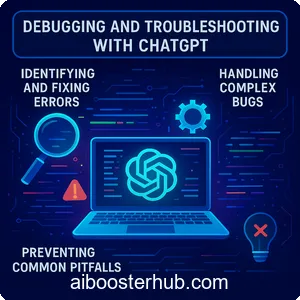
Debugging can be a time-consuming process, but ChatGPT Codex makes it easier. Paste your code and describe the issue—e.g., “This Python script throws a TypeError; can you find the problem?”—and the AI will analyze the code, pinpoint the error, and suggest a fix. It can also explain why the error occurred, helping you avoid similar issues in the future.
Handling complex bugs
For more intricate problems, provide as much context as possible, including error messages, expected behavior, and the code itself. For example, “My JavaScript function isn’t rendering the correct output in React; here’s the code and the console error.” The AI can suggest solutions like checking for state mismanagement or incorrect DOM manipulation, often catching issues that might take hours to diagnose manually.
Preventing common pitfalls
Chat GPT for coding can also help you avoid common coding mistakes. Ask questions like, “What are common errors when using async/await in JavaScript?” or “How do I prevent memory leaks in Python?” The AI will provide best practices and proactive tips, such as proper error handling or resource management, to keep your code robust.
5. Advanced strategies for using ChatGPT in coding
Automating repetitive tasks
ChatGPT code excels at automating repetitive or boilerplate tasks. For example, you can ask it to “Generate a Python script to parse CSV files in a directory” or “Write a bash script to automate file backups.” By offloading these tasks to the AI, you can focus on higher-level problem-solving and creative aspects of development.
Integrating with development workflows
To maximize efficiency, integrate ChatGPT Codex into your development environment. Tools like GitHub Copilot or VS Code extensions allow you to use the AI directly within your editor, providing real-time suggestions as you type. You can also use the API to build custom scripts that automate code