VS Code AI Extensions: Transform Your Coding Experience
VS Code AI extensions, a game-changer for programmers looking to integrate artificial intelligence into their development environment. Visual Studio Code (VS Code), a lightweight yet powerful code editor, has become a favorite among developers due to its flexibility and extensive extension ecosystem. By leveraging AI code editor tools, developers can transform their coding experience, making it faster, smarter, and more efficient.
In this article, we’ll explore how VS Code AI extensions empower developers, diving into their features, benefits, and the transformative impact they have on coding workflows. Let’s dive into the world of the AI code editor and discover how it’s reshaping the way we code.
1. Why VS Code AI extensions matter
The rise of artificial intelligence has revolutionized industries, and software development is no exception. VS Code AI extensions bring the power of AI directly into your coding environment, offering intelligent suggestions, error detection, and automation that save time and reduce frustration. These extensions integrate seamlessly with VS Code, enhancing its capabilities as an IDE AI powerhouse.
Boosting productivity with AI
AI-powered extensions analyze your code in real-time, providing suggestions for completions, optimizations, and even entire functions. This allows developers to focus on high-level problem-solving rather than getting bogged down in repetitive tasks. For instance, AI can predict the next line of code based on context, reducing the need for manual typing and minimizing errors.
Enhancing code quality
One of the standout features of the AI code editor is its ability to improve code quality. AI extensions can detect bugs, suggest refactoring opportunities, and ensure adherence to best practices. This is particularly valuable for teams working on large projects, where maintaining consistency and quality is critical.
Accessibility for all skill levels
Whether you’re a beginner learning the ropes or an expert tackling complex projects, VS Code AI extensions cater to all skill levels. They provide real-time feedback, tutorials, and explanations, making them an invaluable learning tool for newcomers while offering advanced features for seasoned coders.
2. Top VS Code AI extensions to explore
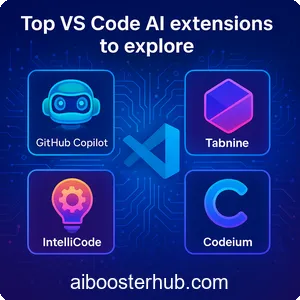
The VS Code marketplace is brimming with AI-powered extensions designed to enhance your coding experience. Below, we highlight some of the most popular and impactful extensions that make VS Code a true AI code editor.
GitHub Copilot
GitHub Copilot is one of the most well-known VS Code AI extensions, acting as a virtual coding assistant. Powered by advanced AI models, it suggests entire lines, functions, or even blocks of code based on the context of your project. It supports multiple programming languages and integrates seamlessly with VS Code, making it a must-have for developers looking to accelerate their workflow.
Tabnine
Tabnine uses machine learning to provide intelligent code completions tailored to your coding style. Unlike traditional autocomplete tools, Tabnine learns from your codebase and offers personalized suggestions, making it a powerful addition to any IDE AI setup. It also supports team-based learning, allowing it to adapt to collaborative projects.
IntelliCode
Microsoft’s IntelliCode is another standout extension that enhances VS Code’s built-in IntelliSense. It provides AI-driven code suggestions, prioritizing the most relevant completions based on your project’s context. IntelliCode is particularly useful for languages like Python, JavaScript, and Java, making it a versatile tool for developers working across multiple stacks.
Codeium
Codeium is a free, AI-powered extension that offers features similar to premium tools. It provides code completions, refactoring suggestions, and even natural language-to-code capabilities. Its lightweight design ensures it runs smoothly within VS Code, making it an excellent choice for developers seeking a cost-effective AI code editor solution.
3. How AI extensions enhance coding workflows
Integrating VS Code AI extensions into your workflow can significantly improve efficiency and creativity. These tools go beyond basic code completion, offering features that streamline every aspect of development.
Real-time code suggestions
AI extensions analyze your code as you type, offering context-aware suggestions that speed up the coding process. Whether it’s completing a function, suggesting a library import, or recommending a design pattern, these tools act as a second pair of eyes, reducing the cognitive load on developers.
Automated debugging
Debugging can be time-consuming, but the AI code editor simplifies the process by identifying potential bugs and offering fixes before you even run the code. This proactive approach saves hours of troubleshooting and ensures cleaner, more reliable code.
Natural language processing
Some VS Code AI extensions allow you to write code using natural language prompts. For example, you can describe a function in plain English, and the AI will generate the corresponding code. This feature is particularly useful for rapid prototyping or when working with unfamiliar languages.
4. Benefits of using AI in VS Code
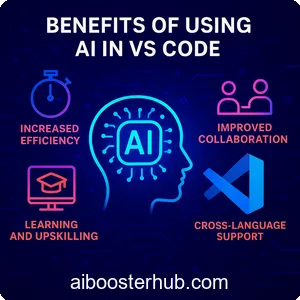
The integration of AI into VS Code brings a host of benefits that make it an essential tool for modern developers. Here’s why IDE AI tools are worth adopting.
Increased efficiency
By automating repetitive tasks and providing instant suggestions, VS Code AI extensions allow developers to write code faster. This efficiency translates to shorter development cycles and faster project delivery.
Improved collaboration
AI extensions can enforce coding standards across teams, ensuring consistency in style and structure. They also provide insights into codebases, making it easier for team members to understand and contribute to shared projects.
Learning and upskilling
For developers looking to learn new languages or frameworks, the AI code editor acts as a mentor, offering real-time guidance and explanations. This makes it easier to pick up new skills without leaving the coding environment.
Cross-language support
Most VS Code AI extensions support a wide range of programming languages, from Python and JavaScript to Go and Rust. This versatility makes them suitable for diverse projects, whether you’re building web apps, mobile applications, or backend systems.
5. Challenges and considerations
While VS Code AI extensions offer immense benefits, there are some challenges to keep in mind when integrating them into your workflow.
Learning curve
Although most extensions are user-friendly, some may require time to master, especially for developers new to AI tools. Understanding how to leverage advanced features like natural language processing or team-based learning can take practice.
Dependency on AI
Over-reliance on the AI code editor can sometimes lead to complacency, where developers may accept suggestions without fully understanding them. It’s important to review AI-generated code to ensure it aligns with your project’s goals and standards.
Performance considerations
AI extensions can be resource-intensive, particularly on older machines. Developers should ensure their systems meet the necessary requirements to run these tools smoothly within VS Code.
6. Tips for maximizing your VS Code AI experience
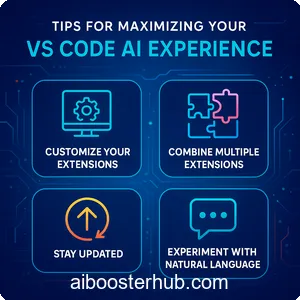
To get the most out of VS Code AI extensions, consider the following tips to optimize your setup and workflow.
Customize your extensions
Many AI code editor tools allow you to fine-tune their settings to match your coding style or project requirements. Take time to explore configuration options, such as adjusting suggestion sensitivity or enabling team-based learning.
Combine multiple extensions
Don’t limit yourself to a single extension. Combining tools like GitHub Copilot for code generation and IntelliCode for intelligent completions can create a powerful IDE AI environment tailored to your needs.
Stay updated
The world of AI is constantly evolving, and so are VS Code AI extensions. Regularly check for updates to ensure you’re benefiting from the latest features and improvements.
Experiment with natural language
If your extension supports natural language processing, experiment with writing prompts to generate code. This can be a fun and efficient way to prototype ideas or explore new programming concepts.
7. The future of AI in coding
The integration of AI into tools like VS Code is just the beginning. As AI technology advances, we can expect even more sophisticated features in the AI code editor. From predictive debugging to fully automated code reviews, the possibilities are endless. Developers who embrace VS Code AI extensions today will be well-positioned to take advantage of these innovations, staying ahead in a competitive industry.
AI-driven development environments
Future IDE AI tools may integrate more deeply with development environments, offering end-to-end solutions for planning, coding, testing, and deployment. This could streamline the entire software development lifecycle.
Personalized coding experiences
As AI models become more advanced, VS Code AI extensions will likely offer hyper-personalized suggestions based on individual coding habits and project histories. This level of customization could redefine how we interact with code editors.
Collaboration with AI
Imagine an AI code editor that acts as a true collaborator, not just a tool. Future extensions could facilitate real-time collaboration between developers and AI, enabling dynamic brainstorming and problem-solving sessions.
8. Conclusion
VS Code AI extensions are transforming the way developers work, offering tools that enhance productivity, improve code quality, and make coding more accessible. By integrating these extensions into your workflow, you can unlock the full potential of the AI code editor, turning VS Code into a powerful IDE AI that caters to your unique needs. Whether you’re writing code for a personal project or collaborating on a large-scale application, these tools provide the intelligence and efficiency to take your coding experience to the next level.
Explore the VS Code marketplace, experiment with different AI extensions, and discover how they can revolutionize your development process. The future of coding is here, and it’s powered by AI.