AI Tools for PowerPoint: Create Professional Presentations
In today’s fast-paced world, creating visually appealing and engaging presentations is essential for professionals, educators, and businesses alike. However, designing a polished PowerPoint presentation from scratch can be time-consuming and challenging, especially for those without advanced design skills. This is where AI tools for PowerPoint come in, revolutionizing the way we craft presentations. By leveraging artificial intelligence, these tools simplify the design process, enhance creativity, and deliver professional results in minutes.
This article explores the best AI tools for PowerPoint, their features, benefits, and how they can transform your presentations. From generating stunning slide designs to automating content creation and even incorporating video editing capabilities, these tools empower users to create professional-grade presentations with ease.
1. Why AI tools are transforming PowerPoint presentations
AI-Powered Presentation Design
Artificial intelligence has reshaped countless industries, and presentation design is no exception. AI tools for PowerPoint use advanced algorithms to analyze content, suggest layouts, and create visually appealing slides tailored to your needs. These tools save time, reduce manual effort, and ensure consistency, making them ideal for professionals who need to deliver high-quality presentations under tight deadlines.
Contextual Design Recommendations
One of the biggest advantages of AI tools is their ability to understand context. By analyzing your input—whether it’s text, images, or themes—these tools generate designs that align with your goals. For example, AI can recommend color schemes, fonts, and layouts that match your brand or audience preferences. Additionally, many AI tools for PowerPoint integrate with creative AI tools for video editing, allowing users to embed dynamic video content into their slides seamlessly.
Streamlined Workflows and Automation
Beyond design, AI tools streamline workflows by automating repetitive tasks like formatting, data visualization, and content summarization. This not only boosts productivity but also ensures your presentations stand out with professional polish. Whether you’re a marketer, educator, or business owner, these tools make it easier to communicate your ideas effectively.
2. Key features to look for in AI tools for PowerPoint
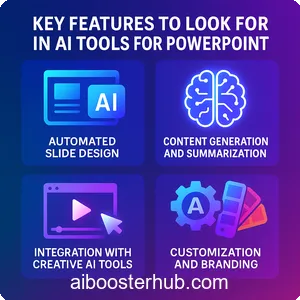
When choosing an AI tool for PowerPoint, it’s important to understand the features that set the best tools apart. Below are some essential functionalities to consider when selecting an AI-powered tool for your presentation needs.
Automated slide design
AI tools for PowerPoint excel at generating slide layouts automatically. By inputting your content, such as text or data, these tools can suggest professional designs, including layouts, fonts, and color schemes. Some platforms even analyze your content to recommend the best way to structure your slides for maximum impact.
Content generation and summarization
Many AI tools offer content creation features, such as generating slide titles, bullet points, or even full scripts based on a topic or keyword. These tools can also summarize lengthy reports or articles into concise points, making it easier to present complex information clearly.
Integration with creative AI tools
The best AI tools for PowerPoint go beyond static slides, offering integration with creative AI tools for video editing and other multimedia. For instance, you can create animated transitions, embed AI-generated videos, or add interactive elements to your slides, enhancing audience engagement.
Customization and branding
AI tools allow you to customize designs to match your brand’s identity. From logo placement to custom color palettes, these tools ensure your presentations align with your visual style. Some platforms even let you upload brand guidelines, which the AI uses to tailor designs automatically.
Real-time collaboration
Many AI tools for PowerPoint support real-time collaboration, enabling teams to work together seamlessly. Whether you’re brainstorming ideas or refining slides, these platforms make it easy to share and edit presentations with colleagues, regardless of location.
Multilingual support
For global teams or audiences, AI tools often include multilingual capabilities, translating content or generating slides in multiple languages. This feature is especially useful for businesses operating in diverse markets.
Data visualization
Turning raw data into compelling visuals is a key strength of AI tools. These platforms can transform spreadsheets or datasets into charts, graphs, or infographics, making complex information easier to understand and visually appealing.
3. Top AI tools for PowerPoint presentations
Several AI-powered platforms have emerged as leaders in transforming PowerPoint presentations. Below, we explore some of the most popular tools, highlighting their unique features and benefits.
Beautiful.ai
Beautiful.ai is a cloud-based platform designed to simplify presentation creation with AI-driven design suggestions. By inputting your content, the tool automatically generates professional slide layouts, adjusting spacing, fonts, and visuals to create a cohesive look. Its smart templates adapt to your content in real-time, ensuring your slides are both polished and engaging. Beautiful.ai also offers team collaboration features, making it ideal for group projects.
Tome
Tome combines AI-driven presentation creation with storytelling capabilities. It generates entire presentations from a single prompt, including text, images, and layouts. Tome’s strength lies in its ability to create narrative-driven slides, making it perfect for pitches or educational presentations. Additionally, it integrates with creative AI tools for video editing, allowing users to embed multimedia content effortlessly.
SlidesAI
SlidesAI is a Google Slides add-on that uses AI to create presentations directly within the Google Workspace ecosystem. It can summarize text, generate slide outlines, and suggest designs based on your input. SlidesAI is particularly useful for users who already rely on Google Slides and want to enhance their workflow with AI-powered features.
Canva AI
Canva, known for its versatile design platform, offers AI-powered features specifically for PowerPoint presentations. Its Magic Design tool generates slide layouts from text prompts or images, while its content generation features help create compelling text for slides. Canva also supports integration with video editing tools, allowing users to create dynamic presentations with embedded videos or animations.
Pitch
Pitch is a collaborative presentation platform that uses AI to streamline design and content creation. Its smart templates and content suggestions make it easy to create visually stunning slides quickly. Pitch also supports real-time collaboration, making it a favorite among teams working on presentations together.
4. How AI tools enhance video integration in PowerPoint

Incorporating videos into PowerPoint presentations can significantly boost audience engagement, and AI tools for video editing make this process seamless. These tools allow users to create, edit, and embed videos directly into slides, adding a dynamic element to presentations.
AI-powered video creation
Many AI tools for video editing, such as Synthesia or Descript, enable users to create professional-grade videos without advanced editing skills. For example, you can generate narrated videos from text scripts or create animated explainer videos that align with your presentation’s theme. These videos can then be embedded into PowerPoint slides, enhancing storytelling and engagement.
Automated video editing
AI tools for video editing can automatically trim, enhance, or add effects to your videos, saving time and ensuring a polished result. For instance, platforms like Runway or Kapwing use AI to remove backgrounds, add subtitles, or apply transitions, making it easy to create videos that complement your slides.
Seamless integration
AI tools for PowerPoint often include features that simplify video integration. By dragging and dropping videos into your slides, you can create interactive presentations that combine text, visuals, and multimedia. Some tools even allow you to sync video playback with slide transitions for a cohesive experience.
5. Benefits of using AI tools for PowerPoint
The adoption of AI tools for PowerPoint offers numerous advantages, making them a game-changer for professionals and creatives alike.
Time efficiency
AI tools significantly reduce the time needed to create presentations. By automating design, content creation, and formatting, these tools allow users to focus on refining their message rather than wrestling with design details.
Professional quality
Even users with limited design experience can create polished, professional-grade presentations using AI tools. The algorithms ensure consistency in design elements, such as fonts, colors, and layouts, resulting in a cohesive and visually appealing final product.
Enhanced creativity
Creative AI tools spark inspiration by suggesting unique layouts, visuals, and content ideas. This allows users to experiment with new styles and formats, pushing the boundaries of traditional presentations.
Accessibility
Many AI tools for PowerPoint are user-friendly and require no advanced technical skills. Their intuitive interfaces make them accessible to beginners and experts alike, democratizing the process of creating high-quality presentations.
Scalability
Whether you’re creating a single presentation or managing a series of slides for a large organization, AI tools scale effortlessly. They can handle everything from small projects to complex, multi-slide decks with ease.
6. Tips for maximizing AI tools in PowerPoint creation
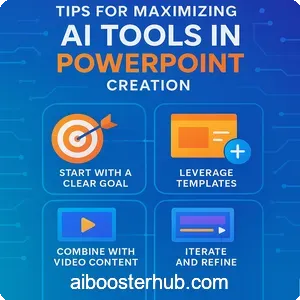
To get the most out of AI tools for PowerPoint, consider the following tips to enhance your workflow and presentation quality.
Start with a clear goal
Before using an AI tool, define the purpose of your presentation. Are you pitching a product, educating an audience, or reporting data? A clear goal helps the AI generate relevant content and designs.
Leverage templates
Most AI tools offer customizable templates that serve as a starting point. Choose a template that aligns with your brand or theme, then let the AI tailor it to your content.
Combine with video content
Incorporate AI-generated videos to make your presentations more engaging. Use AI tools for video editing to create short, impactful clips that reinforce your message.
Iterate and refine
AI tools often provide multiple design or content suggestions. Don’t settle for the first option—experiment with different layouts, fonts, or visuals to find the perfect fit.
Collaborate effectively
If working in a team, use AI tools with collaboration features to streamline feedback and edits. This ensures everyone is aligned and the final presentation reflects collective input.
Test your presentation
Before presenting, test your slides to ensure they display correctly and that any embedded videos or animations work as intended. AI tools often include preview features to help you fine-tune your presentation.
7. The future of AI in presentation design
The role of AI in presentation design is only set to grow. As AI technology advances, we can expect even more sophisticated features, such as real-time audience analysis, voice-activated slide creation, and enhanced personalization. Integration with other creative AI tools, such as those for video editing or graphic design, will further blur the lines between static presentations and dynamic multimedia experiences.
Moreover, AI tools will likely become more intuitive, offering hyper-personalized suggestions based on user preferences and past projects. This will make it easier for professionals to create tailored presentations that resonate with their audiences. As businesses and educators increasingly rely on AI to streamline workflows, these tools will continue to redefine how we communicate ideas visually.
8. Conclusion
AI tools for PowerPoint are transforming the way we create presentations, offering a blend of efficiency, creativity, and professionalism. By automating design, generating content, and integrating with creative AI tools for video editing, these platforms empower users to craft stunning presentations in minutes. Whether you’re a seasoned presenter or a beginner, tools like Beautiful.ai, Tome, SlidesAI, Canva, and Pitch make it easy to bring your ideas to life.
By leveraging the features of these AI tools—such as automated design, content summarization, and video integration—you can create presentations that captivate and inform your audience. As AI continues to evolve, the possibilities for presentation design are endless, making it an exciting time for professionals looking to elevate their visual storytelling.