Imagine: The Ultimate AI-Powered Creative Suite
In the dynamic realm of artificial intelligence, tools that empower creativity are reshaping how we produce visual content. Imagine emerges as a leading platform, seamlessly blending advanced AI technology with user-friendly design to transform text prompts into stunning images, videos, and more.
This article delves into the platform’s features, applications, benefits, and a detailed usage guide, providing a comprehensive overview to help you determine if it’s the ideal addition to your AI toolkit.
1. Introduction
Revolutionizing Creative Industries
The world of artificial intelligence is rapidly transforming creative industries, and Imagine stands at the forefront as a powerful AI image generator. Designed to convert text prompts into visually captivating artwork, it caters to artists, marketers, educators, and hobbyists alike. With no need for advanced artistic skills or expensive software, Imagine makes high-quality content creation accessible to everyone. Its intuitive interface, combined with cutting-edge AI models, allows users to generate everything from photorealistic landscapes to animated videos in seconds.
Accessible and Professional Outputs
What makes Imagine particularly compelling is its free tier, offering up to 50 daily generations without watermarks, ensuring professional outputs even for beginners. Beyond static images, the platform supports video creation, advanced editing, and custom model training, making it a comprehensive creative suite. With a thriving community of over 63,000 members on Discord, users can share ideas, gain inspiration, and collaborate on projects.
2. Key Features of Imagine
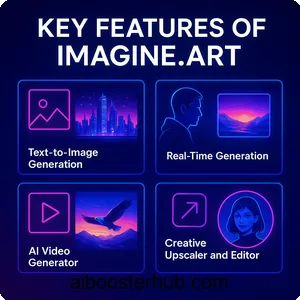
Imagine offers a robust array of features that position it as a leader in AI-driven creativity. These tools streamline workflows, enhance flexibility, and deliver high-quality results for users across skill levels.
Text-to-Image Generation
At the heart of Imagine lies its text-to-image functionality, enabling users to create visuals from descriptive prompts. Powered by advanced models like Flux, Imagen 3, and Kling, the platform supports a range of styles, from hyper-realistic to anime-inspired. Users can customize parameters such as aspect ratios, lighting, and camera angles for precise outputs. For instance, a prompt like “a futuristic cityscape at twilight with neon lights” can produce a vibrant, detailed image in moments.
Real-Time Generation
The real-time generation feature allows users to see images evolve as they tweak prompts, fostering an interactive creative process. This is ideal for rapid ideation, as adjustments to text or settings instantly update the preview. Designers and artists can experiment with variations on the fly, reducing the time spent on trial-and-error and enhancing creative flow.
AI Video Generator
Imagine extends its capabilities to video creation, transforming text or images into high-definition clips. Users can customize motion, lighting, and styles to produce dynamic content for ads, social media, or storytelling. For example, a prompt like “a soaring eagle over a mountain range” can generate a cinematic 4K video, bypassing the need for traditional filming equipment. This feature is a standout for creators needing quick, professional-grade videos.
Creative Upscaler and Editor
The creative upscaler enhances low-resolution images, making them suitable for print or digital use while adding artistic flair. The AI image editor offers tools to adjust brightness, contrast, and apply filters, with advanced options like restructure and restyle for modifying layouts or aesthetics. These tools ensure polished outputs that meet professional standards without requiring external software.
Character Consistency and Custom Model Training
For projects requiring uniform visuals, the character consistency feature maintains consistent styles across images, perfect for storytelling or branding. Users can train custom models by uploading reference images, ensuring cohesive outputs for characters or themes. This is particularly valuable for game developers or comic creators needing consistent visual narratives.
Ideate and Imagine Bot
The Ideate tool provides a real-time sketching experience, instantly translating descriptions into visuals. Complementing this, the Imagine Bot refines basic prompts into detailed ones, improving output accuracy. These features help users overcome creative blocks, making Imagine a versatile tool for both beginners and seasoned creators.
These features collectively make Imagine a powerhouse for creative production, adapting to evolving AI trends and empowering users to stay ahead in 2025.
3. Practical Uses and Applications
Imagine’s versatility spans multiple industries, offering innovative solutions for professional and personal projects. Its ability to generate tailored visuals quickly makes it a go-to tool for diverse applications.
Marketing and Advertising
Marketers use Imagine to create compelling visuals for campaigns, from social media graphics to video ads. The platform’s rapid generation and customization options enable brands to produce engaging content that resonates with audiences. For instance, a company might generate a series of vibrant product mockups or animated reels, boosting click-through rates without high production costs.
Graphic Design and Concept Art
Graphic designers and concept artists rely on Imagine for rapid prototyping and style exploration. By crafting detailed prompts, they can generate visuals in styles like fantasy, cyberpunk, or abstract, refining them with inpainting and upscaling tools. This accelerates the design process, allowing artists to present polished concepts to clients or build portfolios efficiently.
Animation and Entertainment
Animators and filmmakers leverage the video generator and character consistency features to storyboard scenes or design environments. The platform supports the creation of animated sequences or realistic textures for visual effects, streamlining production. Game developers use it to visualize characters, settings, or assets, enhancing development speed and creativity.
E-commerce and Retail
In e-commerce, Imagine powers product visualization by generating images in varied settings or styles. Virtual try-ons for fashion or home decor enhance customer experiences, reducing returns by offering realistic previews. Retailers can also create custom designs for apparel or catalog visuals, streamlining content creation for online platforms.
Interior Design and Architecture
Interior designers and architects benefit from features like restructure and restyle. By uploading renders, users can apply styles like Minimalist or Industrial to visualize spaces instantly. Architects generate 3D models or floor plans, enabling quick iterations and client feedback without labor-intensive rendering processes.
Education and Publishing
Educators create engaging diagrams, simulations, or illustrations for interactive learning, while publishers design book covers and promotional graphics. Custom visuals replace generic stock images, making materials more captivating. Writers use Imagine to visualize scenes or characters, aiding storytelling and marketing efforts.
These applications underscore Imagine’s adaptability, catering to a wide range of creative needs with efficiency and innovation.
4. Benefits of Using Imagine
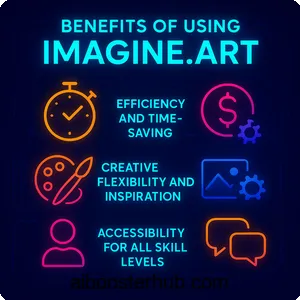
Imagine delivers a host of advantages that transform how users approach creative projects, offering unmatched efficiency and flexibility.
Efficiency and Time-Saving
The platform’s rapid generation capabilities produce visuals in seconds, significantly reducing production time compared to traditional methods. Real-time generation allows instant refinements, enabling marketers, designers, and creators to meet tight deadlines while maintaining high quality. This efficiency is a game-changer for fast-paced industries.
Cost-Effectiveness
With a free tier offering 50 daily generations and no watermarks, Imagine is accessible to budget-conscious users. Paid plans, starting at affordable rates, provide advanced features and higher capacities, eliminating the need for expensive photoshoots or software licenses. This makes it ideal for startups, freelancers, and hobbyists.
Creative Flexibility and Inspiration
Imagine encourages experimentation with endless style variations and prompt enhancements via the Imagine Bot. Users can explore new artistic directions, overcoming creative blocks with ease. This flexibility fosters innovation, whether for professional branding or personal art exploration.
High-Quality and Customizable Outputs
The platform delivers professional-grade visuals with resolutions up to 8K, ensuring crisp, print-ready outputs. Features like character consistency and custom model training maintain cohesive aesthetics, ideal for storytelling or brand identity. Customizable parameters allow precise alignment with creative visions.
Accessibility for All Skill Levels
No prior artistic or technical expertise is required, making Imagine inclusive. Beginners can start with simple prompts, while advanced settings cater to professionals seeking nuanced control. This accessibility democratizes art creation, empowering a diverse user base.
Community and Support
With over 63,000 members on Discord, Imagine fosters a vibrant community for collaboration and inspiration. Users can share creations, access tutorials, and learn from peers. Responsive email support and comprehensive documentation ensure help is always available, enhancing the user experience.
These benefits make Imagine an indispensable tool for modern creatives, blending affordability with powerful functionality.
5. Step-by-Step Usage Guide
Getting started with Imagine is intuitive, thanks to its user-friendly design. This guide walks you through the process, from setup to advanced techniques, ensuring you can maximize the platform’s capabilities.
Signing Up and Navigating the Dashboard
Visit the Imagine website and create a free account using an email address or social login. The dashboard provides access to tools like text-to-image, video generator, and editing features. Explore the interface, which includes a prompt bar, style options, and a gallery for managing creations.
Creating Your First Image
In the text-to-image tool, enter a detailed prompt, such as “a mystical forest with glowing mushrooms under moonlight.” Select a model like Flux for realism or Kling for animation, and adjust settings like aspect ratio (e.g., 4:3 for square images) or CFG scale for detail. Use negative prompts like “blurry, crowded” to exclude unwanted elements, then click “Generate” to create your image.
Using Advanced Features
For video creation, input a text prompt or upload an image, then customize motion, lighting, or style (e.g., cinematic or watercolor). The creative upscaler enhances low-resolution visuals, while restructure and restyle tools modify layouts or aesthetics. To ensure character consistency, train a custom model with 6–50 reference images, specifying desired attributes.
Tips for Optimal Results
Craft specific, detailed prompts to improve accuracy, such as “a vintage bicycle in a sunny park with soft focus.” Experiment with seed values for reproducible variations and use the upscaler for final polish. Join the Discord community for prompt-crafting tips and inspiration from other users.
Editing and Exporting
Use the AI editor to tweak colors, textures, or composition, adding text overlays or filters for a refined look. Export images in PNG or videos in MP4, ensuring compatibility with social media, print, or digital platforms. Organize creations in collections for easy access and project management.
Exploring Specialized Uses
For applications like interior design, upload a room render and apply styles via the restyle tool to visualize decor options. In e-commerce, generate product mockups in varied settings. Iterate based on real-time previews to align outputs with project goals, ensuring professional results.
This guide equips you to navigate Imagine effectively, unlocking its full creative potential.
6. Conclusion
Imagine is a trailblazer in the AI-driven creative landscape of 2025, offering a seamless blend of accessibility, power, and innovation. From generating stunning images to crafting dynamic videos, it simplifies complex creative tasks, empowering users across industries. Its free tier, vibrant community, and continuous updates ensure it remains a leader in AI art generation. Whether you’re a professional designer, a content creator, or a curious beginner, Imagine invites you to transform your ideas into reality. Start exploring today and redefine what’s possible with AI-powered creativity.