MagicLight AI: Revolutionizing Video Creation with AI
In the fast-evolving world of artificial intelligence, tools that streamline video production are becoming essential for creators, marketers, and educators alike. MagicLight AI stands out as a comprehensive platform designed to empower users with AI-driven capabilities for turning text into captivating animated videos.
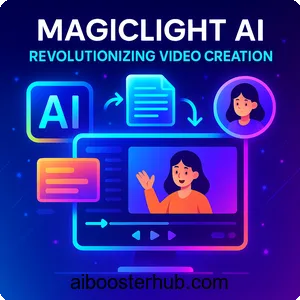
This article dives deep into what makes MagicLight AI a game-changer, exploring its features, applications, benefits, and how to get started, providing you with everything you need to decide if it’s the right fit for your AI toolkit.
1. Introduction
At its core, Magiclight operates as an all-in-one text-to-video converter, capable of producing animations from a single prompt or detailed script. Recent 2025 enhancements have extended its video length capabilities to up to 60 minutes, catering to users who create in-depth narratives like YouTube series or educational courses. The platform employs advanced AI algorithms to ensure consistent character designs, emotional voice narrations, and a variety of visual styles, delivering outputs that are engaging and professional.
Understanding the evolution of MagicLight AI
Since its inception, MagicLight AI has rapidly evolved based on user input. In 2025, key updates include faster rendering times, expanded animation styles drawing inspiration from models like Sora and Luma, and better mobile integration through its Android app. These developments address the increasing demand for AI tools that handle long-form content, distinguishing it from generators limited to short clips.
Why choose MagicLight AI in 2025
Amid a crowded market of AI video tools, MagicLight AI excels with its emphasis on extended narratives and character uniformity. It’s particularly suited for creators requiring depth, such as storytellers or educators, and its free trial lowers the entry barrier for those exploring artificial intelligence.
2. Key features of MagicLight AI
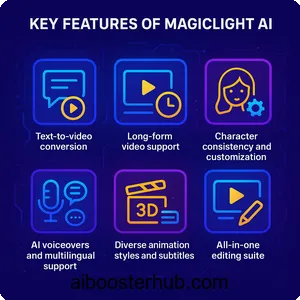
MagicLight AI comes equipped with a range of cutting-edge features that utilize artificial intelligence to simplify and enhance video production. These capabilities make it a versatile option for generating high-quality animations tailored to different user needs.
Text-to-video conversion
The foundational feature enables users to input text prompts, scripts, or stories, which the AI then converts into animated videos automatically. It processes the content to construct scenes, incorporate dialogues, and add transitions, with 2025 improvements leading to more natural narrative flows.
Long-form video support
A standout capability is the support for videos up to 60 minutes long, allowing for the creation of comprehensive content like full stories or tutorials. This exceeds many competitors’ limits, maintaining quality and engagement across extended durations.
Character consistency and customization
Users can upload a single image to generate consistent characters throughout scenes, with options to clone faces or adjust appearances. Styles vary from anime to realistic, promoting immersive and personalized storytelling.
AI voiceovers and multilingual support
Featuring over 30 emotional voice profiles across more than 10 languages, the AI delivers natural-sounding narrations that align with the video’s tone. This enhances accessibility for international users.
Diverse animation styles and subtitles
With 20+ styles available, including 2D, 3D, Disney-like, or epic renders, users can customize visuals. Automatic subtitles and background music provide a polished finish, along with effects and glam filters.
All-in-one editing suite
The platform combines scripting, design, voice integration, and editing in a single interface, enabling real-time modifications without additional software. 2025 updates have improved mobile app functionality for creation on the go.
Free AI art generation
In addition to videos, it generates images from text that can be animated or used independently, encouraging creativity in AI art.
Credit system and free trial
New users receive 300 credits for a free trial, sufficient for a 6-minute HD video. Paid plans offer more credits, and exports are watermark-free even on free tiers. Promotions in 2025 include bonus credits via invite codes.
These features position MagicLight AI as a complete AI video maker, regularly updated to align with 2025 user expectations.
3. Applications and uses of MagicLight AI
The adaptability of MagicLight AI makes it applicable across various domains, demonstrating how artificial intelligence can elevate content in multiple sectors.
Content creation for social media
Influencers utilize it to produce viral animated clips for platforms like TikTok or Instagram, with one-click generation facilitating quick, captivating posts that increase engagement.
Marketing and promotional videos
Businesses convert product descriptions into dynamic ads, reducing production expenses while appealing to global audiences through multilingual features.
Educational content development
Educators craft animated lessons extending up to 60 minutes, simplifying complex subjects with subtitles and voiceovers in diverse languages.
Storytelling and entertainment
Authors animate books or children’s stories, creating engaging experiences such as bedtime tales or AI-generated films for YouTube.
Business and corporate training
Organizations efficiently develop training materials, employing consistent characters for interactive, multilingual sessions.
Art and design exploration
Artists use text-to-image generation to develop concepts, animating them for digital artwork or NFTs while experimenting with various styles.
Personal projects and hobbies
Individuals create customized videos for personal events or hobbies, easily transforming stories into shareable animations.
These applications underscore MagicLight AI’s impact in harnessing artificial intelligence for creative and professional purposes.
4. Benefits of using MagicLight AI
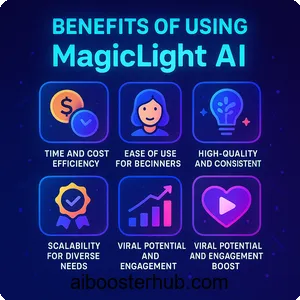
Integrating MagicLight AI into your routine provides numerous advantages, especially for those enthusiastic about AI tools in video production.
Time and cost efficiency
It automates the production process, shrinking hours of effort to minutes and obviating the need for teams or costly software, thus being highly budget-friendly.
Ease of use for beginners
Requiring no previous expertise, the intuitive design and guides make it approachable, fostering experimentation with AI.
High-quality and consistent outputs
AI ensures professional-grade animations with seamless consistency, surpassing manual methods in viewer engagement.
Enhanced creativity and innovation
By managing technical elements, it allows users to innovate freely, with diverse styles sparking unique endeavors.
Scalability for diverse needs
It accommodates videos from brief clips to 60 minutes, with international features broadening accessibility.
Viral potential and engagement boost
Content optimized for sharing sees higher views, as evidenced by user reports.
Free entry point
Trial credits enable risk-free exploration, enhanced by 2025 promotions.
Positive user feedback
Reviews commend its dependability and enjoyment, although some point out areas like voice intonation for improvement.
These benefits establish MagicLight AI as a vital tool in 2025.
5. Step-by-step usage guide
MagicLight AI’s user-friendly approach simplifies video creation; this guide reflects 2025 features for the web and app.
Signing up and accessing the platform
Navigate to Magiclight or install the app; register with email to claim 300 free credits. Apply invite codes for extras.
Navigating the dashboard
Browse areas like “Create Video,” project library, and settings; use templates for quick starts.
Inputting your script or prompt
In “Create AI Video,” input text; for lengthy content, segment into 30-60 second scenes for better outcomes.
Customizing characters and styles
Upload images for characters, pick styles (e.g., anime, 3D), and refine expressions.
Adding voiceovers and audio
Select voices, languages, and emotions; incorporate music and effects from available options.
Generating subtitles and finalizing
Activate auto-subtitles; review the storyboard and adjust transitions.
Rendering and editing the video
Initiate generation; post-render, edit scenes and regenerate freely.
Downloading and sharing
Export in HD without watermarks; share or download directly.
Tips for optimal results
Employ detailed prompts, begin with short tests, and schedule during low-traffic periods for quicker rendering.
This guide helps maximize MagicLight AI’s potential.
6. Conclusion
MagicLight AI is transforming artificial intelligence in video creation, delivering robust features for seamless animations in 2025. From extended video support to customizable characters, it meets creators’ demands, with advantages like efficiency and quality fueling its rise. Suitable for education, marketing, or entertainment, this tool unleashes creative possibilities. Begin with the free trial today and discover how AI can convert your concepts into enthralling videos. As tech progresses, MagicLight AI leads the way, spurring innovation in content development.