AI Productivity Tools – Workflow Optimization
In today’s fast-paced world, maximizing efficiency is key to staying ahead. AI productivity tools have emerged as game-changers, helping individuals and teams streamline workflows, automate repetitive tasks, and focus on high-value work. By leveraging artificial intelligence, these tools enhance decision-making, improve time management, and boost overall productivity. This article explores the transformative power of AI for productivity, diving into the best AI productivity apps, their benefits, and how they can optimize your workflow.
Whether you’re a freelancer, entrepreneur, or part of a large organization, integrating AI tools for productivity into your daily routine can unlock new levels of efficiency. From task automation to intelligent scheduling, these tools are designed to make work smarter, not harder. Let’s explore how AI productivity assistants can revolutionize your workflow.
1. What are AI productivity tools?
AI productivity tools are software applications powered by artificial intelligence that help users manage tasks, optimize workflows, and enhance efficiency. These tools use machine learning, natural language processing (NLP), and data analytics to automate repetitive processes, provide insights, and offer personalized recommendations. Unlike traditional productivity software, AI tools for productivity adapt to user behavior, learn from patterns, and continuously improve their functionality.
For example, an AI productivity assistant might analyze your calendar to suggest optimal meeting times or prioritize emails based on their urgency. These tools go beyond basic automation, offering intelligent solutions tailored to individual needs. By reducing manual effort, they allow users to focus on creative and strategic tasks, making them indispensable for modern professionals.
2. Why AI for productivity matters
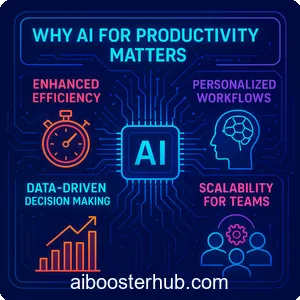
The rise of AI for productivity reflects the growing demand for smarter, more efficient work processes. Here’s why these tools are becoming essential:
Enhanced efficiency
AI productivity tools eliminate time-consuming tasks by automating repetitive processes like data entry, email sorting, or document summarization. For instance, tools like Grammarly use AI to refine your writing in real time, saving hours of manual editing.
Personalized workflows
Unlike one-size-fits-all solutions, AI tools for productivity adapt to your unique work style. They learn from your habits, preferences, and goals to provide tailored suggestions, such as prioritizing tasks or recommending the best time to tackle complex projects.
Data-driven decision making
AI-powered tools analyze vast amounts of data to provide actionable insights. For example, project management platforms like Asana or ClickUp use AI to predict project timelines and identify potential bottlenecks, helping teams stay on track.
Scalability for teams
For businesses, AI productivity assistants scale effortlessly across teams, ensuring seamless collaboration. Tools like Slack’s AI integrations streamline communication by summarizing conversations and highlighting action items.
By incorporating AI for productivity, individuals and organizations can achieve more in less time, making these tools a cornerstone of modern workflows.
3. Top AI productivity tools to optimize your workflow
The market is brimming with best AI productivity apps designed to cater to various needs. Below, we highlight some of the most impactful tools that can transform how you work.
Notion AI
Notion AI is a versatile AI productivity assistant that enhances the popular Notion platform. It offers features like automated note summarization, content generation, and task prioritization. Whether you’re drafting a blog post or organizing a project, Notion AI streamlines the process by suggesting improvements and automating repetitive tasks.
Grammarly
Grammarly is a household name among AI tools for productivity, known for its real-time grammar and style corrections. Beyond fixing typos, it analyzes tone, clarity, and engagement, making it ideal for professionals who want polished communication without spending hours editing.
ClickUp
ClickUp’s AI capabilities make it a standout for project management. Its AI productivity tools include automated task assignments, deadline predictions, and progress tracking. By analyzing team performance, ClickUp helps managers optimize workflows and allocate resources effectively.
Otter.ai
For those who rely on meetings or interviews, Otter.ai is a game-changer. This AI productivity assistant transcribes audio in real time, generates summaries, and identifies key action items. It’s perfect for professionals who need to capture and organize spoken content efficiently.
Zapier
Zapier’s AI-driven automation connects thousands of apps to create seamless workflows. By automating tasks like transferring data between platforms or sending automated notifications, Zapier saves countless hours, making it one of the best AI productivity apps for integration.
These tools represent just a fraction of the AI tools for productivity available, but they showcase the diversity and power of AI in enhancing workflows.
4. Benefits of using AI productivity assistants
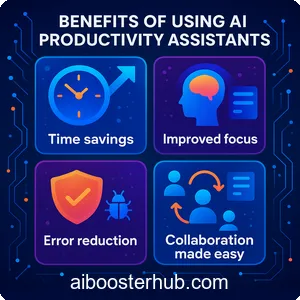
Integrating AI productivity assistants into your routine offers a range of benefits that go beyond simple task automation. Here’s how they can transform your work:
Time savings
By automating repetitive tasks, AI productivity tools free up valuable time. For example, tools like Zapier can automate email follow-ups, while AI-powered schedulers like Clara find the best meeting times without back-and-forth emails.
Improved focus
AI for productivity helps eliminate distractions by prioritizing tasks and filtering notifications. Tools like Todoist use AI to suggest which tasks to tackle first, ensuring you stay focused on what matters most.
Error reduction
Human error is inevitable, but AI productivity assistants minimize mistakes. Grammarly catches writing errors, while project management tools like Trello flag inconsistencies in workflows, ensuring higher accuracy.
Collaboration made easy
For teams, AI tools for productivity enhance collaboration by streamlining communication and task delegation. Platforms like Monday.com use AI to assign tasks based on team members’ strengths, fostering better teamwork.
These benefits make AI productivity tools indispensable for anyone looking to optimize their workflow and achieve more with less effort.
5. How to choose the best AI productivity apps
With so many best AI productivity apps available, selecting the right one can be overwhelming. Here are key factors to consider when choosing an AI productivity assistant:
Identify your needs
Start by assessing your specific needs. Are you looking to automate repetitive tasks, improve writing, or manage projects? For example, writers may prioritize Grammarly, while teams might opt for ClickUp or Asana.
Ease of integration
Ensure the tool integrates seamlessly with your existing software. AI productivity tools like Zapier excel at connecting apps, making them ideal for complex workflows.
User experience
A user-friendly interface is crucial for adoption. Tools like Notion AI offer intuitive designs that make it easy for beginners and advanced users alike to leverage their features.
Scalability
Choose tools that scale with your needs. For instance, ClickUp supports both individual freelancers and large teams, making it a versatile choice for growing businesses.
Customization
Look for tools that allow customization to fit your workflow. AI tools for productivity like Notion AI let you tailor templates and workflows to your preferences.
By evaluating these factors, you can select the best AI productivity apps that align with your goals and enhance your efficiency.
6. Real-world applications of AI productivity tools
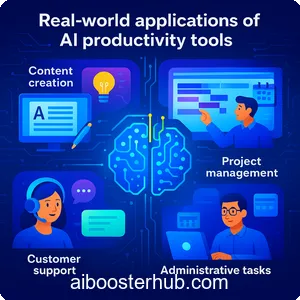
AI productivity tools are transforming industries and workflows across the board. Here’s how they’re being usedearlier used in real-world scenarios:
Content creation
Writers and marketers use tools like Grammarly and Notion AI to draft, edit, and organize content. These tools streamline the creative process, ensuring high-quality output with minimal effort.
Project management
Teams rely on AI tools for productivity like ClickUp and Monday.com to manage complex projects. AI-driven insights help predict delays taps into actionable recommendations, such as optimal resource allocation.
Customer support
AI-powered chatbots and virtual assistants, like those from Intercom, handle customer queries efficiently, reducing response times and improving customer satisfaction.
Administrative tasks
Freelancers and small businesses use AI productivity assistants like Zapier to automate invoicing, scheduling, and data entry, freeing up time for core business activities.
These examples highlight the versatility of AI for productivity, showing how it can be applied across diverse fields to drive efficiency.
7. Tips for maximizing AI productivity tools
To get the most out of AI productivity tools, consider these strategies:
Start small
Begin with one or two tools to avoid overwhelming your workflow. For example, try Grammarly for writing or Zapier for automation before expanding to more complex tools.
Leverage integrations
Maximize efficiency by connecting tools. For instance, linking Slack with ClickUp ensures seamless task updates and communication.
Regularly review usage
Periodically assess how AI tools for productivity are performing. Are they saving time? Adjust your approach based on what delivers the most value.
Train your team
If you’re implementing AI productivity assistants for a team, invest in training to ensure everyone uses the tools effectively.
By following these tips, you can fully harness the power of AI for productivity to optimize your workflow.
8. Conclusion
AI productivity tools are revolutionizing how we work, offering smarter, faster, and more personalized ways to optimize workflows. From automating mundane tasks to providing data-driven insights, AI for productivity empowers users to achieve more with less effort. By carefully selecting the best AI productivity apps and implementing them strategically, you can transform your workflow, boost efficiency, and stay ahead in a competitive world.
Integration with emerging technologies like augmented reality (AR) and virtual reality (VR) could further enhance AI tools for productivity, creating immersive workspaces where AI assists in real-time decision-making. As these tools become more intuitive and accessible, they’ll continue to redefine efficiency, making AI productivity assistants a staple in both personal and professional settings.
Explore tools like Notion AI, Grammarly, ClickUp, Otter.ai, and Zapier to see Alla scoperta di AI productivity assistants can unlock a world of possibilities. Start optimizing your workflow today and experience the power of AI tools for productivity firsthand.