Vibe coding tools review: AI-powered development environment
Imagine a world where coding feels less like wrestling with syntax and more like collaborating with a brilliant partner who instantly grasps your vision. That’s the promise of vibe coding tools—AI-powered platforms that let you articulate your ideas in plain English, transforming them into functional code with remarkable ease. For those passionate about artificial intelligence, this isn’t just a convenience; it’s a game-changer.
In this in-depth review, we’ll explore the world of vibe coding tools, highlighting their core features, showcasing the best vibe coding tools available, and providing actionable insights to help you pick the perfect one for your projects. Whether you’re a seasoned developer or a curious beginner, this guide will equip you with everything you need to leverage vibe code AI effectively.
1. Introduction to vibe coding tools
Vibe coding AI blends human intuition with machine precision, offering a conversational workflow that prioritizes your creative vision. Instead of typing out every line of code, you describe what you want—whether it’s a fitness tracking app or an automated workflow—and the AI generates the foundation, often in seconds. This shift allows developers to focus on innovation rather than syntax, making prototyping faster and more intuitive.
Why vibe coding tools matter
The appeal of vibe coding tools lies in their ability to bridge the gap between idea and execution. Traditional coding demands precision, deep knowledge of programming languages, and hours of troubleshooting. Vibe coding tools, however, let you express your ideas naturally, as if you’re brainstorming with a teammate. The AI interprets your prompts, generates code, and often suggests optimizations you might not have considered. This makes them ideal for rapid prototyping, small-scale projects, or even complex applications where speed and creativity are paramount.
For AI enthusiasts, these tools represent a practical application of natural language processing and machine learning. They’re not just about writing code—they’re about redefining how we interact with technology. By lowering the barrier to entry, vibe coding tools invite more people into the world of development, fostering innovation across industries.
2. Core features of vibe coding tools
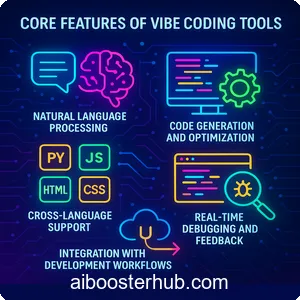
What sets vibe coding tools apart from traditional IDEs or basic code editors? It’s their AI-driven capabilities that make coding feel like a conversation rather than a chore. Let’s break down the key features that define these platforms and why they’re essential for modern developers.
Natural language processing
At the heart of vibe code AI is advanced natural language processing (NLP). This allows you to input commands or describe functionality in plain language—like “create a login page with email authentication” or “build a chatbot that responds to customer inquiries.” The AI parses these instructions, translates them into code, and often provides multiple implementation options. This feature is a lifeline for those who may not know specific syntax but understand the logic of what they want to build.
Code generation and optimization
Unlike traditional autocomplete tools, vibe coding platforms generate entire codebases from high-level descriptions. Need a Python script to analyze data or a React component for a dynamic UI? Just describe it, and the AI delivers functional code. Many tools also optimize the output, suggesting cleaner syntax, faster algorithms, or modular structures to improve performance and maintainability.
Cross-language support
The best vibe coding tools support a wide range of programming languages—Python, JavaScript, HTML/CSS, Java, and more. This flexibility ensures you’re not locked into one ecosystem. Whether you’re building a web app, a mobile app, or a backend API, these tools adapt to your preferred stack, making them versatile for diverse projects.
Real-time debugging and feedback
AI doesn’t just write code; it helps you fix it. Many vibe coding tools offer real-time debugging, flagging errors, suggesting fixes, and even explaining why certain approaches might fail. This is particularly valuable for beginners who are still learning the nuances of programming or for experienced developers tackling unfamiliar languages.
Integration with development workflows
From GitHub integration to seamless deployment options, vibe coding tools fit into existing workflows. Some platforms allow you to export code directly to repositories, connect with cloud services, or even generate documentation automatically. This makes them practical for both solo developers and teams collaborating on larger projects.
3. The best vibe coding tools on the market
With so many options out there, which vibe coding tools stand out? Here’s a curated list of the best vibe coding tools, each excelling in specific areas like usability, language support, or advanced AI capabilities.
CodeVibe AI
CodeVibe AI is a powerhouse for developers who want a seamless blend of conversational coding and robust output. Its intuitive interface lets you describe complex applications in simple terms, and it generates code across multiple languages, including Python, JavaScript, and TypeScript. What sets it apart is its ability to refine code based on iterative feedback—you can tweak your prompts, and it adjusts the output without starting from scratch. Ideal for web and mobile app development, CodeVibe AI also integrates with popular version control systems.
VibeCode Pro
VibeCode Pro shines in rapid prototyping. Its AI engine excels at turning vague ideas into structured code, making it a favorite for entrepreneurs and startups. It supports an extensive library of frameworks, from React to Django, and offers built-in templates for common project types like e-commerce platforms or data dashboards. The real-time debugging feature is particularly strong, catching errors before you even run the code.
AIdeator
AIdeator is tailored for beginners and non-coders. Its drag-and-drop interface combined with vibe coding AI allows users to build functional prototypes without writing a single line of code manually. You can describe features like “a to-do list with drag-and-drop functionality,” and AIdeator generates the HTML, CSS, and JavaScript needed. It’s perfect for creating MVPs or pitching ideas to stakeholders.
SynthCode
For developers working on complex, multi-language projects, SynthCode is a standout. It not only generates code but also provides detailed explanations of how it works, making it a great learning tool. Its strength lies in backend development, with robust support for APIs, databases, and server-side logic. SynthCode’s AI also suggests architectural patterns, like microservices or MVC, to keep your projects scalable.
4. Benefits of using vibe coding tools
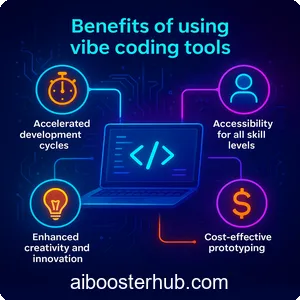
Why should you incorporate vibe coding tools into your workflow? The advantages go beyond just saving time—they transform how you approach development.
Accelerated development cycles
By automating repetitive tasks like writing boilerplate code or setting up project structures, vibe coding tools drastically reduce development time. What might take hours or days in a traditional environment can be done in minutes, allowing you to iterate faster and deliver projects sooner.
Accessibility for all skill levels
Whether you’re a seasoned developer or a complete novice, vibe code AI makes coding approachable. Beginners can build functional apps without deep technical knowledge, while experts can use these tools to streamline complex tasks, freeing up time for creative problem-solving.
Enhanced creativity and innovation
With the grunt work handled by AI, you’re free to focus on the big picture—designing unique features, experimenting with new ideas, or exploring unconventional solutions. Vibe coding tools act like a creative partner, suggesting possibilities you might not have considered.
Cost-effective prototyping
For startups or freelancers, building prototypes can be resource-intensive. Vibe coding tools lower the barrier by generating functional code quickly, allowing you to test ideas without investing heavily in development hours.
5. Challenges and limitations
No tool is perfect, and vibe coding tools have their share of challenges. Understanding these limitations will help you use them effectively and set realistic expectations.
Overreliance on AI
While vibe coding AI is powerful, it’s not infallible. The generated code may not always align perfectly with your vision, especially for highly specialized or niche projects. Developers still need to review and tweak the output to ensure it meets specific requirements.
Learning curve for advanced features
Although these tools are designed to be user-friendly, mastering their advanced features—like custom prompt engineering or integrating with external APIs—can take time. Beginners may need to invest in learning how to craft effective prompts to get the best results.
Dependency on tool ecosystems
Some vibe coding platforms lock you into their ecosystem, limiting flexibility. For example, exporting code to other environments or integrating with certain frameworks may require extra steps or workarounds.
Potential for generic code
While AI-generated code is functional, it can sometimes lack the nuanced optimization that comes from human expertise. For performance-critical applications, you may need to refine the output manually to meet specific standards.
6. How to choose the right vibe coding tool
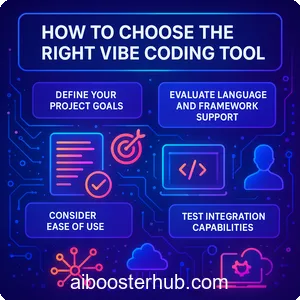
With so many options, selecting the best vibe coding tools for your needs requires careful consideration. Here’s a guide to help you make an informed decision.
Define your project goals
Are you building a simple prototype or a complex, production-ready application? Tools like AIdeator are great for quick MVPs, while SynthCode suits intricate, multi-language projects. Clarify your goals to narrow down your options.
Evaluate language and framework support
Ensure the tool supports the programming languages and frameworks you plan to use. If you’re focused on web development, check for robust JavaScript and React support. For data science projects, prioritize Python compatibility.
Consider ease of use
If you’re new to coding, prioritize tools with intuitive interfaces and strong documentation. For experienced developers, look for platforms that offer advanced customization and integration options.
Test integration capabilities
Check how well the tool integrates with your existing workflow—GitHub, cloud platforms, or CI/CD pipelines. Seamless integration can save you time and reduce friction during development.
Explore community and support
A strong user community and reliable support can make a big difference. Look for tools with active forums, detailed tutorials, or responsive customer support to help you troubleshoot issues.
7. Getting started with vibe coding tools
Ready to dive into vibe coding tools? Here’s a step-by-step guide to kickstart your journey.
Step 1: Choose your tool
Based on your project needs and skill level, pick one of the best vibe coding tools from our list. Most platforms offer free trials or limited versions, so you can test them before committing.
Step 2: Start with simple prompts
Begin with straightforward tasks, like generating a basic webpage or a simple script. This helps you get comfortable with the tool’s interface and prompt system. For example, try prompting: “Create a responsive landing page with a navigation bar.”
Step 3: Iterate and refine
Use the AI’s feedback and debugging features to tweak the generated code. Experiment with different prompts to see how the AI responds, and refine your instructions for better results.
Step 4: Integrate and deploy
Once you’re happy with the code, integrate it into your workflow. Export it to your repository, test it in your development environment, and deploy it to see your project come to life.
Step 5: Join the community
Engage with other users through forums, tutorials, or social platforms. Sharing tips and learning from others can help you unlock the full potential of vibe code AI.
8. Conclusion
Vibe coding tools are transforming the development landscape, making coding more accessible, efficient, and creative. By leveraging vibe coding AI, developers of all skill levels can bring their ideas to life without getting bogged down in technical details. From rapid prototyping to complex application development, these tools offer a powerful blend of innovation and practicality.
Whether you’re exploring vibe code AI for the first time or looking to optimize your workflow, the best vibe coding tools provide endless possibilities. By understanding their features, benefits, and limitations, you can choose the right platform to suit your needs and start building with confidence. So, why wait? Dive into the world of vibe coding and see how AI can elevate your development game.